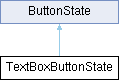
Button State for a button that uses TextBox to display a value and units inside the button.
More...
#include <ButtonState.h>
|
|
| | TextBoxButtonState (Canvas &Destination, const ConfigTextBox_t &config, buttonCallbackFunction callback) |
| | Construct a new Text Box Button State object.
|
| |
| | ~TextBoxButtonState (void)=default |
| | Destroys the Text Box Button State object.
|
| |
|
| void | begin (void) override |
| | Initializes the button state object. This method should be called before first use of the object.
|
| |
| void | draw (void) override |
| | Draw the button onto Destination canvas at the specified location.
|
| |
| void | update (const char *text) |
| | Update the text inside the TextBox.
|
| |
| void | update (int value) |
| | Update the text inside the TextBox.
|
| |
| void | setUnits (const char *text) |
| | Update the units text inside the TextBox.
|
| |
| | ButtonState (Canvas &destCanvas, uint16_t x, uint16_t y, uint16_t width, uint16_t height, buttonCallbackFunction callback, unsigned short cornerRadius, uint8_t borderWidth, uint16_t borderColor, uint16_t fillColor16) |
| | Construct a new Button State object.
|
| |
| virtual | ~ButtonState ()=default |
| | Default destructor.
|
| |
| virtual void | updateBackground (void) |
| | Update the button background graphics.
|
| |
| virtual void | drawOpaque (void) |
| | Draw the button assuming images have an opaque background.
|
| |
| virtual void | draw (Canvas &newCanvas, bool TransparentOn=true) |
| | Draw the button onto the specified canvas at the specified location.
|
| |
| void | callback (void) const |
| | Calls the callback function associated with this button state.
|
| |
| uint16_t | width (void) const |
| | Returns the width of the button state.
|
| |
| uint16_t | height (void) const |
| | Returns the height of the button state.
|
| |
| uint16_t | x (void) const |
| | Returns the X location of the button state on the destination canvas.
|
| |
| uint16_t | y (void) const |
| | Returns the Y location of the button state on the destination canvas.
|
| |
Button State for a button that uses TextBox to display a value and units inside the button.
◆ TextBoxButtonState()
Construct a new Text Box Button State object.
- Parameters
-
| Destination | [in] Canvas where the final button will be drawn |
| config | [in] Configuration structure defining the button properties |
| callback | [in] Callback function associated with this button state |
◆ ~TextBoxButtonState()
| TextBoxButtonState::~TextBoxButtonState |
( |
void | | ) |
|
|
default |
Destroys the Text Box Button State object.
- Parameters
- None.
◆ begin()
| void TextBoxButtonState::begin |
( |
void | | ) |
|
|
overridevirtual |
Initializes the button state object. This method should be called before first use of the object.
- Parameters
- None.
Reimplemented from ButtonState.
◆ draw()
| void TextBoxButtonState::draw |
( |
void | | ) |
|
|
inlineoverridevirtual |
Draw the button onto Destination canvas at the specified location.
- Parameters
- None.
Reimplemented from ButtonState.
◆ setUnits()
| void TextBoxButtonState::setUnits |
( |
const char * | text | ) |
|
|
inline |
Update the units text inside the TextBox.
- Parameters
-
| [in] | text | Null-terminated character array containing the units text |
◆ update() [1/2]
| void TextBoxButtonState::update |
( |
const char * | text | ) |
|
|
inline |
Update the text inside the TextBox.
- Parameters
-
| [in] | text | Null-terminated character array containing the text |
◆ update() [2/2]
| void TextBoxButtonState::update |
( |
int | value | ) |
|
|
inline |
Update the text inside the TextBox.
- Parameters
-
| [in] | value | Integer value to be displayed |
The documentation for this class was generated from the following files:
- C:/Users/david/Documents/PlatformIO/Solo_Controller/Solo_Controller_Repo/src/Display/ButtonState.h
- C:/Users/david/Documents/PlatformIO/Solo_Controller/Solo_Controller_Repo/src/Display/ButtonState.cpp

 Public Member Functions inherited from ButtonState
 1.13.2