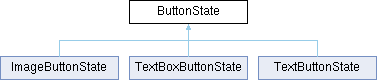
Base class used by all derived Button State classes.
More...
#include <ButtonState.h>
|
|
| | ButtonState (Canvas &destCanvas, uint16_t x, uint16_t y, uint16_t width, uint16_t height, buttonCallbackFunction callback, unsigned short cornerRadius, uint8_t borderWidth, uint16_t borderColor, uint16_t fillColor16) |
| | Construct a new Button State object.
|
| |
| virtual | ~ButtonState ()=default |
| | Default destructor.
|
| |
|
| virtual void | updateBackground (void) |
| | Update the button background graphics.
|
| |
| virtual void | draw (void) |
| | Draw the button assuming images have transparent background.
|
| |
| virtual void | drawOpaque (void) |
| | Draw the button assuming images have an opaque background.
|
| |
| virtual void | draw (Canvas &newCanvas, bool TransparentOn=true) |
| | Draw the button onto the specified canvas at the specified location.
|
| |
| virtual void | begin (void) |
| | Initializes the button state object. This method should be called before first use of the object.
|
| |
| void | callback (void) const |
| | Calls the callback function associated with this button state.
|
| |
|
| uint16_t | width (void) const |
| | Returns the width of the button state.
|
| |
| uint16_t | height (void) const |
| | Returns the height of the button state.
|
| |
| uint16_t | x (void) const |
| | Returns the X location of the button state on the destination canvas.
|
| |
| uint16_t | y (void) const |
| | Returns the Y location of the button state on the destination canvas.
|
| |
|
| Canvas * | _ButtonGfxCanvas = nullptr |
| | Canvas that holds the colorized button graphics. Derived classes will define this canvas as appropriate.
|
| |
Base class used by all derived Button State classes.
This class is used internally by the Button class and its derivatives.
◆ buttonCallbackFunction
| typedef void(* ButtonState::buttonCallbackFunction) (void) |
Defines the form of the callback functions expected by the Button class.
◆ ButtonState()
| ButtonState::ButtonState |
( |
Canvas & | destCanvas, |
|
|
uint16_t | x, |
|
|
uint16_t | y, |
|
|
uint16_t | width, |
|
|
uint16_t | height, |
|
|
buttonCallbackFunction | callback, |
|
|
unsigned short | cornerRadius, |
|
|
uint8_t | borderWidth, |
|
|
uint16_t | borderColor, |
|
|
uint16_t | fillColor16 ) |
|
inline |
Construct a new Button State object.
- Parameters
-
| [in] | destCanvas | Canvas where the button will be drawn |
| [in] | x | X location of the image in the destination canvas |
| [in] | y | Y location of the image in the destination canvas |
| [in] | width | Width of the image |
| [in] | height | Height of the image |
| [in] | callback | Callback function associated with this button state |
| [in] | cornerRadius | Corner radius for the button |
| [in] | borderWidth | Border width in pixels of the button border |
| [in] | borderColor | Border color in 16-bit RGB format |
| [in] | fillColor16 | Fill color in 16-bit RGB format |
◆ ~ButtonState()
| virtual ButtonState::~ButtonState |
( |
| ) |
|
|
virtualdefault |
Default destructor.
- Parameters
- None.
◆ begin()
| virtual void ButtonState::begin |
( |
void | | ) |
|
|
inlinevirtual |
◆ callback()
| void ButtonState::callback |
( |
void | | ) |
const |
|
inline |
Calls the callback function associated with this button state.
- Parameters
- None.
◆ draw() [1/2]
| void ButtonState::draw |
( |
Canvas & | newCanvas, |
|
|
bool | TransparentOn = true ) |
|
virtual |
Draw the button onto the specified canvas at the specified location.
- Parameters
-
| [in] | newCanvas | Canvas where the button will be drawn |
| [in] | TransparentOn | If true, the button graphics will be drawn with transparency |
◆ draw() [2/2]
| void ButtonState::draw |
( |
void | | ) |
|
|
virtual |
Draw the button assuming images have transparent background.
- Parameters
- None.
Reimplemented in TextBoxButtonState.
◆ drawOpaque()
| void ButtonState::drawOpaque |
( |
void | | ) |
|
|
virtual |
Draw the button assuming images have an opaque background.
- Parameters
- None.
◆ height()
| uint16_t ButtonState::height |
( |
void | | ) |
const |
|
inline |
Returns the height of the button state.
- Returns
- height of the button state in pixels
◆ updateBackground()
| void ButtonState::updateBackground |
( |
void | | ) |
|
|
virtual |
Update the button background graphics.
- Parameters
- None.
◆ width()
| uint16_t ButtonState::width |
( |
void | | ) |
const |
|
inline |
Returns the width of the button state.
- Returns
- width of the button state in pixels
◆ x()
| uint16_t ButtonState::x |
( |
void | | ) |
const |
|
inline |
Returns the X location of the button state on the destination canvas.
- Returns
- UL X location of the button state in pixels
◆ y()
| uint16_t ButtonState::y |
( |
void | | ) |
const |
|
inline |
Returns the Y location of the button state on the destination canvas.
- Returns
- UL Y location of the button state in pixels
◆ _ButtonGfxCanvas
| Canvas* ButtonState::_ButtonGfxCanvas = nullptr |
|
protected |
Canvas that holds the colorized button graphics. Derived classes will define this canvas as appropriate.
The documentation for this class was generated from the following files:
- C:/Users/david/Documents/PlatformIO/Solo_Controller/Solo_Controller_Repo/src/Display/ButtonState.h
- C:/Users/david/Documents/PlatformIO/Solo_Controller/Solo_Controller_Repo/src/Display/ButtonState.cpp

 1.13.2